-

Fototrend
Mielőtt kommentelsz, olvasd el az Összefoglalót!
(Frissítve: 2020.05.31.)

Új hozzászólás Aktív témák
-

akaido
addikt
válasz
 KillBorn
#147400
üzenetére
KillBorn
#147400
üzenetére
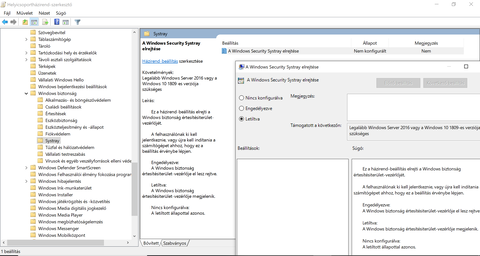
"Enable Windows Defender Icon via Group Policy
Step 1: Press Windows key and R key together to open Run dialog. Then type gpedit.msc in the box and click OK to continue.
Step 2: In the Local Group Policy Editor window, please navigate to the following location.
Computer Configuration \ Administrative Templates \ Windows Components \ Windows Security \ SystrayStep 3: On the right panel of Systray, double-click Hide Windows Security Systray and choose Restrict. Then click OK to continue.
After all steps are finished, reboot your computer and check whether you have hidden Windows Defender icon."


Új hozzászólás Aktív témák
• OFF topik
• TILOS a warez!
• Windows 10 frissítési kisokos
- PC Játékok
- Xbox / Microsoft Store feltöltőkártya kód (digitális, HU) több címlet, több db, azonnal, olcsón
- MEGA AKCIÓ! - Jogtiszta Windows - Office & Autodesk & CorelDRAW - Azonnal - Számlával - Garanciával
- Játékkulcsok ! : PC Steam, EA App, Ubisoft, Windows és egyéb játékok
- Eredeti Microsoft termékek - MEGA Akciók! Windows, Office Pro Plus, Project Pro, Visio Pro stb.
- 227 - Lenovo LOQ (15IRX10) - Intel Core i7-13650HX, RTX 5060
- Apple iPhone 15 128 GB Black 1 év Garancia Beszámítás Házhozszállítás
- AKCIÓ! Gigabyte B450M R5 5 2600 8GB DDR4 512GB SSD GTX 1650 4GB ZALMAN T3 Plus Deepcool 400W
- HP ZBOOK Firefly 16 G10 /i7-1355U/16GB/1 TB SSD/FHD+/IPS/NVIDIA 4 GB Magyar bill
- 226 - Lenovo LOQ (15IRX10) - Intel Core i7-13650HX, RTX 5060
Állásajánlatok

Cég: Laptopműhely Bt.
Város: Budapest