-

Fototrend
A Microsoft Excel topic célja segítséget kérni és nyújtani Excellel kapcsolatos problémákra.
Kérdés felvetése előtt olvasd el, ha még nem tetted.

Új hozzászólás Aktív témák
-
#47661
 Fire/SOUL/CD
félisten
eszgé100
#47660
Fire/SOUL/CD
félisten
eszgé100
#47660
válasz
 eszgé100
#47660
üzenetére
eszgé100
#47660
üzenetére
A megoldást már más megírta, úgy hogy csak INNEN bemásolom a kódot.
Annyi módosítást hajtottam csak végre a kódban, hogy a 3 db privát funkció deklarációban beleírtam a PtrSafe tulajdonságot, mivel enélkül 64 bites rendszer alatt nem futna le a kód.Module1-be kerülő kód:
Option Explicit
Private Const HKEY_CURRENT_USER As Long = &H80000001
Private Const HKCU = HKEY_CURRENT_USER
Private Const KEY_QUERY_VALUE = &H1&
Private Const ERROR_NO_MORE_ITEMS = 259&
Private Const ERROR_MORE_DATA = 234

Private Declare PtrSafe Function RegOpenKeyEx Lib "advapi32" _
    Alias "RegOpenKeyExA" ( _
    ByVal HKey As Long, _
    ByVal lpSubKey As String, _
    ByVal ulOptions As Long, _
    ByVal samDesired As Long, _
    phkResult As Long) As Long

Private Declare PtrSafe Function RegEnumValue Lib "advapi32.dll" _
    Alias "RegEnumValueA" ( _
    ByVal HKey As Long, _
    ByVal dwIndex As Long, _
    ByVal lpValueName As String, _
    lpcbValueName As Long, _
    ByVal lpReserved As Long, _
    lpType As Long, _
    lpData As Byte, _
    lpcbData As Long) As Long

Private Declare PtrSafe Function RegCloseKey Lib "advapi32.dll" ( _
    ByVal HKey As Long) As Long

Public Function GetPrinterFullNames() As String()
Dim Printers() As String ' array of names to be returned
Dim PNdx As Long    ' index into Printers()
Dim HKey As Long    ' registry key handle
Dim Res As Long     ' result of API calls
Dim Ndx As Long     ' index for RegEnumValue
Dim ValueName As String ' name of each value in the printer key
Dim ValueNameLen As Long    ' length of ValueName
Dim DataType As Long        ' registry value data type
Dim ValueValue() As Byte    ' byte array of registry value value
Dim ValueValueS As String   ' ValueValue converted to String
Dim CommaPos As Long        ' position of comma character in ValueValue
Dim ColonPos As Long        ' position of colon character in ValueValue
Dim M As Long               ' string index

' registry key in HCKU listing printers
Const PRINTER_KEY = "Software\Microsoft\Windows NT\CurrentVersion\Devices"

PNdx = 0
Ndx = 0
' assume printer name is less than 256 characters
ValueName = String$(256, Chr(0))
ValueNameLen = 255
' assume the port name is less than 1000 characters
ReDim ValueValue(0 To 999)
' assume there are less than 1000 printers installed
ReDim Printers(1 To 1000)

' open the key whose values enumerate installed printers
Res = RegOpenKeyEx(HKCU, PRINTER_KEY, 0&, _
    KEY_QUERY_VALUE, HKey)
' start enumeration loop of printers
Res = RegEnumValue(HKey, Ndx, ValueName, _
    ValueNameLen, 0&, DataType, ValueValue(0), 1000)
' loop until all values have been enumerated
Do Until Res = ERROR_NO_MORE_ITEMS
    M = InStr(1, ValueName, Chr(0))
    If M > 1 Then
        ' clean up the ValueName
        ValueName = Left(ValueName, M - 1)
    End If
    ' find position of a comma and colon in the port name
    CommaPos = InStr(1, ValueValue, ",")
    ColonPos = InStr(1, ValueValue, ":")
    ' ValueValue byte array to ValueValueS string
    On Error Resume Next
    ValueValueS = Mid(ValueValue, CommaPos + 1, ColonPos - CommaPos)
    On Error GoTo 0
    ' next slot in Printers
    PNdx = PNdx + 1
    Printers(PNdx) = ValueName & " on " & ValueValueS
    ' reset some variables
    ValueName = String(255, Chr(0))
    ValueNameLen = 255
    ReDim ValueValue(0 To 999)
    ValueValueS = vbNullString
    ' tell RegEnumValue to get the next registry value
    Ndx = Ndx + 1
    ' get the next printer
    Res = RegEnumValue(HKey, Ndx, ValueName, ValueNameLen, _
        0&, DataType, ValueValue(0), 1000)
    ' test for error
    If (Res <> 0) And (Res <> ERROR_MORE_DATA) Then
        Exit Do
    End If
Loop
' shrink Printers down to used size
ReDim Preserve Printers(1 To PNdx)
Res = RegCloseKey(HKey)
' Return the result array
GetPrinterFullNames = Printers
End Function

Sub Test()
    Dim Printers() As String
    Dim N As Long
    Dim S As String
    Printers = GetPrinterFullNames()
    For N = LBound(Printers) To UBound(Printers)
        S = S & Printers(N) & vbNewLine
    Next N
    MsgBox S, vbOKOnly, "Printers"
End Sub
Eredménye (most az Én gépemen futtatva)
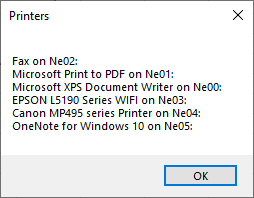
Nyilván esetedben annyiban kell módosítani pluszban a kódot, hogy ne a képernyőre irogassa ki az összes nyomtatót, hanem a cikluson belül, megvizsgálod, hogy az aktuális printer neve tratalmazza-e az általad használt 2 printer nevének egyikét, ha igen, akkor "elévarázsololod" a \\ jelet és a megfelelő változódnak meg is van az értéke és kb. meg is vagy.


Új hozzászólás Aktív témák
 Fferi50
- Windows 10 11 Pro Office 19 21 Pro Plus Retail kulcs 1 PC Mac AKCIÓ! Automatikus 0-24
- Vírusirtó, Antivirus, VPN kulcsok GARANCIÁVAL!
- Eredeti Microsoft termékek - MEGA Akciók! Windows, Office Pro Plus, Project Pro, Visio Pro stb.
- The Elder Scrolls Online Imperial Collector s Edition
- HP. Laptop. i5. Model: 15-da1002nq
- GYÖNYÖRŰ iPhone 14 Pro 128GB Space Black -1 ÉV GARANCIA - Kártyafüggetlen, MS4619, 100% Akksi
- MacBook Pro 14" M1 32GB RAM 1 TB 27%-os áfás számla (0449AB)
- White GAMER PC! Ultra 265 / RTX 5070 Ti / 32GB 6000MHz / 1TB NVMe / B660 / 850w Gold! BeszámítOK
- GAMING PC! Ryzen 5700X / RTX 3070 / 32GB 3600MHz / SSD / 700w Gold!
- 27% - ÚJ - Captiva 16" Notebook! Ryzen 9955HX / RTX 5090 / 64GB DDR5 / 2TB NVMe! BeszámítOK
Állásajánlatok

Cég: Laptopműhely Bt.
Város: Budapest